AI Sprite Sheet Maker
A sprite sheet creator for 2D games. Upload one character image or describe it, pick the actions, and download a PNG spritesheet, a GIF and a JSON atlas. No sign-up.
3 free actions a day. No account or card needed.
Character
Upload a character image
or drop it here, or paste it
PNG, JPG or WebP, up to 10 MB. One full-body character works best.
No character yet? Try a sample
Actions
Add a character to generate. Free today: 3 actions left.
Upload only characters you have the right to use. See the Terms.
Sheet
Your frames line up here, one row per action.
Sample sprite sheets
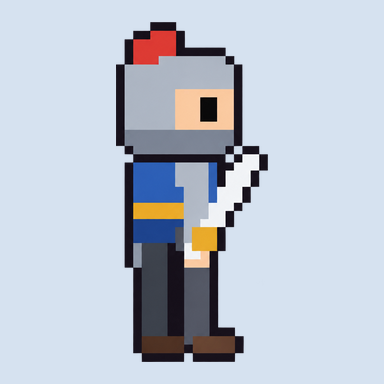
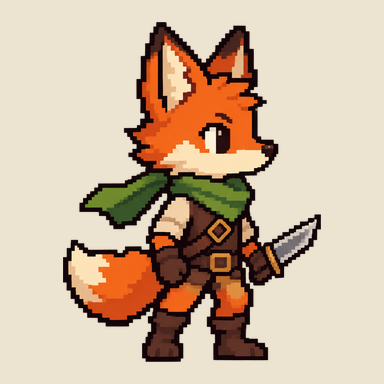
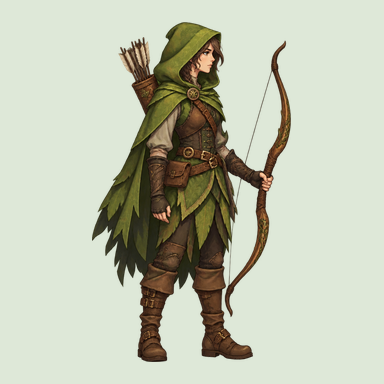
One character image in, one row of frames per action out. Each sample plays straight from its exported sheet.
What the sprite sheet maker gives you
AI Sprite Sheet Creator turns one character into animation frames and packs them into a sheet your engine can slice.
| Input | One character image (PNG, JPG or WebP, up to 10 MB) or a text description |
|---|---|
| Actions | Idle, Walk, Run, Jump, Attack. Pick one or several per sheet |
| Frames per action | 4, 8 or 16 |
| Frame size | 32, 48, 64, 96, 128 or 256 px square, every frame the same size |
| Layout | One row per action, character anchored at the bottom centre of each frame |
| Background | Transparent |
| Files | PNG sprite sheet, animated GIF per action, JSON atlas, ZIP of everything |
| GIF speed | 4 to 24 fps, looping |
| Time | About 20 to 40 seconds per action |
| Price | 3 free actions a day with no account. More with credits |
How to make a sprite sheet from one image
Add your character
Upload a PNG, JPG or WebP up to 10 MB, or describe the character in a sentence. A full-body character on a plain background gives the clearest frames.
Pick actions and frame size
Choose from Idle, Walk, Run, Jump and Attack, then 4, 8 or 16 frames per action and a frame size from 32 to 256 px.
Check the animation and download
Watch each action play. Regenerate any action that drifts, then download the PNG sheet, the GIF and the JSON atlas.
New to this? Read how to make a sprite sheet, step by step.
Importing the sheet into your engine
Every frame is the same size, so slicing is one setting. The numbers below are for an 8-frame action at 64 × 64 px.
| Engine | Where | Setting |
|---|---|---|
| Unity | Sprite Mode: Multiple, then Sprite Editor, Slice | Grid By Cell Size, 64 × 64 |
| Godot | AnimatedSprite2D, SpriteFrames, Add frames from sprite sheet | Horizontal 8, Vertical 1 per action row |
| GameMaker | Sprite editor, Image, Import Strip Image | 8 frames, 64 × 64, 8 per row |
| Phaser | this.load.spritesheet() | { frameWidth: 64, frameHeight: 64 } |
Already have a sprite sheet?
These two tools run in your browser. Nothing is uploaded, and they have no daily limit.
Pricing
- Free3 actions a day. No account, no card. PNG, GIF and JSON atlas included, no watermark.
- Credits1 credit is 1 action of up to 8 frames. Packs are one-time purchases paid with PayPal and never expire: 20 credits for $4.99, 60 credits for $9.99, 150 credits for $19.99.
- Failed actionsAn action that fails does not use a free action or a credit.
Questions
What is a sprite sheet creator?
A sprite sheet creator, also written spritesheet creator or called a sprite sheet maker, puts the frames of an animation into one image so a game engine can play them in order. This one also draws the frames: you give it one character image or a description, and it returns a row of equal-size frames for each action you pick.
Can AI make a sprite sheet from a single image?
Yes. Upload one character and choose from Idle, Walk, Run, Jump and Attack. You get 4, 8 or 16 frames per action on a transparent background. AI frames are not always perfect: a frame can drift in proportion, so each action has its own regenerate button.
Is the sprite sheet maker free?
You can generate 3 actions a day for free without an account. The PNG sheet, the GIF and the JSON atlas are all included, with no watermark. If you need more in one day, you can buy credits. The slicer and the GIF converter have no limit.
How do I use the sprite sheet in Unity, Godot, GameMaker or Phaser?
Import the PNG and slice it by the frame size you chose, for example 64 × 64 px with 8 frames per row. The JSON atlas lists every frame's x, y, width and height and tags each action with its frame range and speed, for engines and loaders that read an atlas.
What frame sizes and frame counts can I choose?
Frames are square: 32, 48, 64, 96, 128 or 256 px. Each action has 4, 8 or 16 frames and takes one row of the sheet. A sheet with 3 actions at 8 frames and 64 px is 512 × 192 px.
What files can I download?
A transparent PNG sprite sheet, a looping GIF for each action at 4 to 24 fps, a JSON atlas with frame coordinates, and a ZIP that holds all of them.
How long does it take to generate a sprite sheet?
About 20 to 40 seconds per action, so a sheet with 3 actions takes one to two minutes. Progress shows per action, and finished actions start playing while the rest are still being drawn.
What can I do when a frame looks wrong?
Regenerate that one action. The other rows stay as they are. An action that fails or times out does not use a free action or a credit.